LEADING RETIREMENT SOLUTIONS UPDATED FOR 2026
A payroll company that lists 401(k) integration as a capability is describing a starting point rather than an answer. What settles it is whether it connects to your recordkeeper, in which direction, and carrying what.
Whether a payroll provider integrates with a 401(k) plan depends on the specific pairing of that payroll system and that recordkeeper, not on the payroll provider alone. A payroll company may support a full two way connection with one recordkeeper, a one way file with another, and nothing at all with a third.
This is the part that catches employers out. Almost every payroll company lists retirement plan integration as a capability, and almost every one of them is describing something real. The claim is just broader than the question, because integration is not a feature a payroll system either has or lacks. It is a relationship between two named systems, built once, maintained by both sides, and different in every combination.
So the question worth asking is never “does this payroll provider integrate.” It is “does this payroll provider integrate with the recordkeeper I actually use, in which direction, and carrying which fields.”
This guide covers how to get a straight answer to that question, what a connection needs to carry to be worth having in 2026, what the options are when your provider does not connect, and what switching actually involves. For the mechanics of how integration works and what it prevents, see our guide to 401(k) payroll integration. The information here is educational and is not a substitute for advice on a specific plan.
Why “We Integrate With 401(k) Providers” Is Not the Whole Answer
Payroll systems and recordkeeping platforms are separate products built by separate companies. A connection between any two of them has to be built deliberately: field mappings agreed, file formats matched, a transmission method established, and both sides maintaining it as the products change.
That work is done pair by pair. A payroll provider with connections to eight recordkeepers has built eight of them. It does not follow that a ninth exists, and it does not follow that the eight are equivalent. Some will be full two way connections. Others will be a one way file. Some will be a scheduled file exchange.
There is a second layer to this. Two systems can be connected and still not carry everything the plan needs. A connection that moves pre-tax deferrals but not Roth deferrals is a real integration and an incomplete one. A connection that moves contributions but not hours worked leaves eligibility tracking where it was. The existence of a connection and the scope of it are separate questions, and both are worth asking.
The Three Levels of Connection
Before checking any specific provider, it helps to know what you are checking for. There are three arrangements, and providers do not always use the same words for them.
360 degree integration
Data moves both ways. Payroll sends contributions to the recordkeeper each pay period, and the recordkeeper sends back the changes participants make on their own: a new deferral percentage, a Roth election, a loan starting or ending. Routine data may move automatically, although employer review, approvals, reconciliation, and exception handling may still be required.
180 degree integration
Data moves one way. Payroll sends the contribution file. Deferral changes made by participants are entered into payroll separately, which means the two systems stay aligned through that step rather than automatically.
File exchange with no integration
Someone exports from payroll, reformats to the recordkeeper’s template, and uploads it. This is sometimes described as integration because a file is involved. The distinction matters because the schedule depends on a person rather than on the systems.
| ASK | FILE EXCHANGE | 180 DEGREE | 360 DEGREE |
|---|---|---|---|
| Contributions reach the recordkeeper | Manually | Automatically | Automatically |
| Deferral changes reach payroll | Manually | Manually | Automatically |
| Employer action each pay period | Every cycle | Usually only for exceptions | Review and exceptions |
| Automatic escalation handled | Manually | Manually | Automatically |
| Watch point | A cycle is missed | A rate goes stale | A file rejects unnoticed |
How to Check Whether Your Payroll Provider Connects
Five steps, in this order. The order matters, because the first one saves the most time.
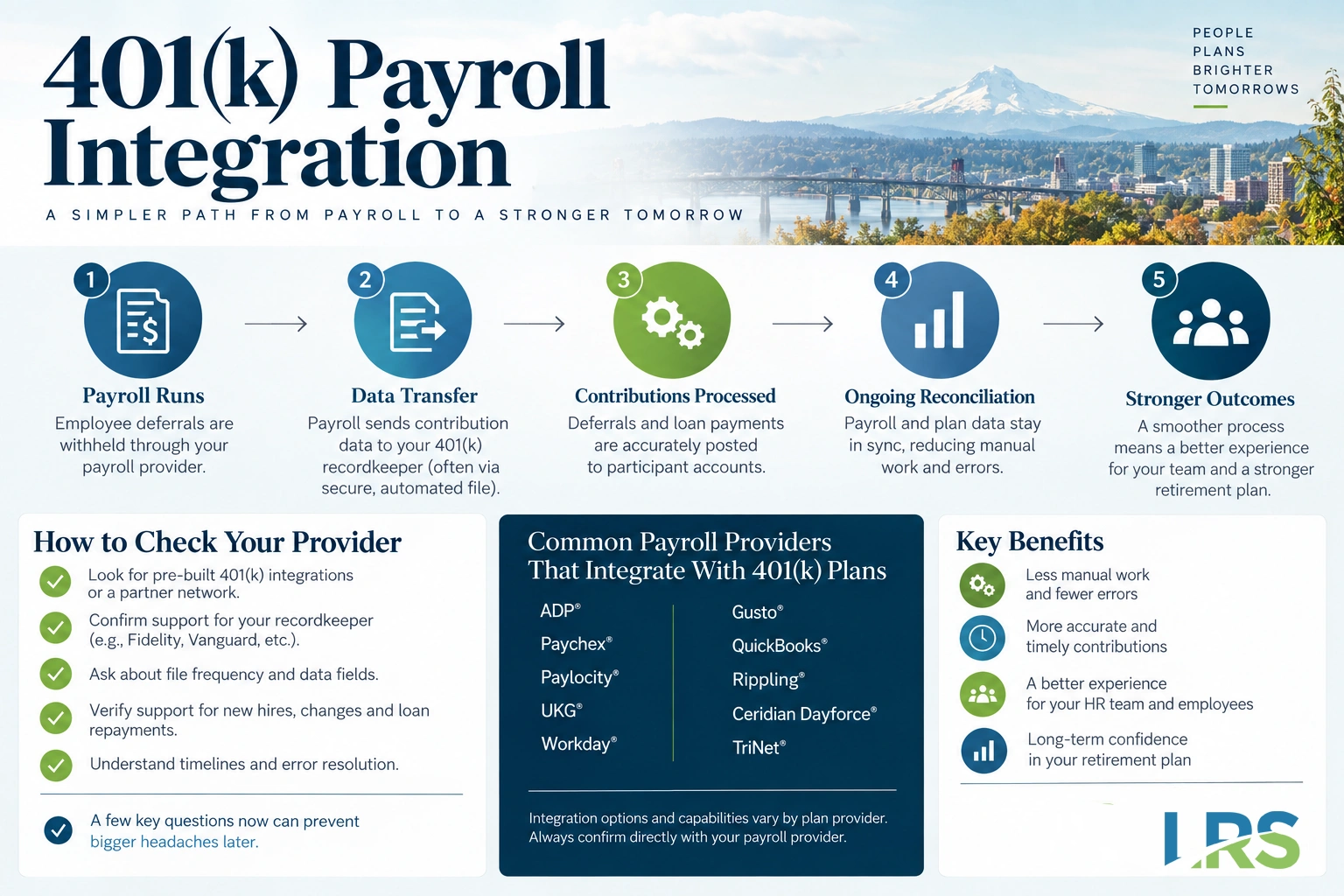
- Ask the recordkeeper first, then the payroll provider.Recordkeepers maintain a list of the payroll systems they connect to and generally know the state of each connection. Payroll providers publish longer lists covering more recordkeepers, so starting with the recordkeeper narrows the question quickly.
- Ask by name, in both directions.Not “do you integrate with retirement plans” but “do you have a live connection with this recordkeeper, and is it one way or two way.” If the second question cannot be answered, that is worth pursuing before anything else.
- Ask what the file actually carries.Pre-tax and Roth deferrals separately, catch-up contributions flagged, loan repayments identified by loan, employer contributions, hours worked, and eligible compensation as the plan document defines it. Ask for the field list.
- Ask who has done it before.A connection that has run for two years between these two systems is a different proposition from one that will be built for you. Both can work. One has known behavior.
- Ask what happens when a file rejects.Who is notified, how quickly, and who resolves it. This is the question most likely to show how established a connection is.
If the answers to steps two and three are general rather than specific, that is worth following up. An established connection has documentation behind it and someone on each side who can describe it precisely.
Payroll Provider by Payroll Provider
These are the payroll and HCM systems employers most often ask us about, shown with the level of integration each currently has with the LRS recordkeeping platform. The payroll partner directory is maintained by LRS and carries the full list, including systems not shown here.
| PAYROLL SYSTEM | INTEGRATION WITH THE LRS PLATFORM |
|---|---|
| Proliant | 180 degree, one way |
| Heartland | No direct integration today |
| Namely | 180 degree, one way |
| PuzzleHR | No direct integration today |
| Zenefits | No direct integration today |
| Apex | No direct integration today |
| Wurk | 360 degree, two way |
Where a system is not currently integrated, a direct connection is not available today. That is not a reason to change payroll providers on its own, and the options section below covers why. LRS is open to exploring integration solutions and can work with an employer to evaluate options for connecting a payroll system and a 401(k) plan, so a system that does not appear on the directory today is worth asking about rather than ruling out.
A connection existing is also not the end of the question. What it carries matters as much as whether it exists, which is what the next section covers.
What a Connection Needs to Carry in 2026
The bar has moved. A connection built five years ago to move pre-tax deferrals is not necessarily sufficient for a plan operating under current rules, because three changes have put new demands on payroll data.
Prior year FICA wages, for the Roth catch-up rule
Beginning January 1, 2026, a catch-up eligible participant whose FICA wages from the employer sponsoring the plan exceeded $150,000 in the prior calendar year must make catch-up contributions as designated Roth contributions. The $150,000 figure is the indexed threshold the IRS set in Notice 2025-67, and Treasury issued final regulations on the rule, Treasury Decision 10033, in September 2025.
The wage figure that decides who is affected is FICA wages as defined at Internal Revenue Code section 3121(a), reported in Box 3 of the Form W-2. That figure originates in payroll rather than in the recordkeeping system, so the two systems need a way to share it for the rule to be applied correctly.
Changing deferral rates, for automatic escalation
Section 101 of the SECURE 2.0 Act of 2022 requires most plans established after December 29, 2022 to enroll employees automatically from the 2025 plan year, at an initial rate between 3% and 10%, escalating one percentage point a year to at least 10% and no more than 15%. Deferral rates now change on a schedule rather than only when a participant asks, and a one way connection means those changes are entered in payroll separately each year.
Hours worked, for long-term part-time eligibility
Employees working at least 500 hours in two consecutive years now generally become eligible to make deferrals even without meeting the plan’s standard hours requirement, which our guide to long-term part-time eligibility covers. Payroll or connected timekeeping and HR systems are often the primary sources of that data. A connection that moves dollars but not hours leaves the plan without a direct way to identify who crossed the threshold.
The compensation definition the plan actually uses
Plans differ on whether bonuses, commissions, overtime and fringe benefits count as eligible compensation. A connection configured against a different definition than the plan document uses will produce contributions that do not match the document, every pay period. This is worth confirming at setup rather than during a later review.
Questions to Ask Before You Sign
Whether you are choosing a payroll provider, choosing a recordkeeper, or reviewing an arrangement you already have, the same list applies.
About the connection itself
- Is there a live connection between these two specific systems today?
- Is it one way or two way, and what travels in each direction?
- Does it carry Roth deferrals separately from pre-tax?
- Does it flag catch-up contributions, and can it pass prior year FICA wages?
- Does it carry loan repayments, identified by loan?
- Does it carry hours worked, and which compensation definition is it configured against?
About running it
- Does it handle automatic enrollment and escalation without manual updates?
- How are new hires, terminations and rehires communicated?
- What is the transmission schedule relative to the pay date?
- Who is notified when a file rejects, how quickly, and who resolves it?
- Is there a setup fee, an ongoing fee, and do either change with headcount?
- Who maintains the connection when either system updates?
Two of those are worth pressing on. The transmission schedule matters because withheld contributions become plan assets as soon as they can reasonably be segregated from the employer’s general assets, under Department of Labor regulation 29 CFR 2510.3-102. A schedule that transmits several days after each pay date builds that gap into the process.
The rejection process matters for the same reason. Where a file fails and nobody is watching, the contributions in it are not posted while the deposit timing rule continues to run, and correcting a late deposit is more work than catching the failure.
What to Do If Your Payroll Provider Does Not Connect
There are three options, and switching payroll is only one of them. Employers reach for it first more often than the situation calls for.
Option one: keep payroll, add a support service
A payroll support service prepares and transmits the contribution file each pay period on the employer’s behalf. The payroll relationship is untouched, the manual step moves off the employer’s desk, and the transmission runs on a schedule. Leading Retirement Solutions offers enhanced payroll support services on this basis.
Option two: change recordkeepers
Less disruptive than it sounds in some cases, and more in others. A recordkeeper change involves a plan conversion with its own timeline, blackout considerations and participant communications, but it leaves payroll, which touches every employee every pay period, in place. Worth evaluating where the recordkeeper relationship is the one under review anyway.
Option three: change payroll providers
Sometimes right, frequently premature. Payroll touches tax filing, time tracking, benefits deductions, garnishments and reporting, and a change carries work across all of it. Making that change to solve a retirement plan file transfer is a large step for a specific problem.
Should You Switch Payroll Providers to Get an Integration?
A structured way to think about it, rather than a recommendation, because the answer depends on facts specific to each company.
| SWITCHING IS MORE LIKELY TO MAKE SENSE WHEN | SWITCHING IS MORE LIKELY PREMATURE WHEN |
|---|---|
| The payroll relationship is already under review for reasons unrelated to the plan | Payroll works well and the retirement file is the only open item |
| Headcount is growing and manual processing is already straining | Headcount is stable and the file is small |
| The plan has had a late deposit or a deferral error in the last two years | The manual process has run cleanly for years |
| The current contract is near renewal anyway | A contract has significant term remaining |
| Multiple entities or states make manual processing complex | One entity, one state, one pay frequency |
Where payroll is otherwise working, a support service often addresses the problem without the cost and work of a conversion. Where payroll is already under review for other reasons, an integration requirement is a reasonable thing to add to that list rather than the reason on its own.
What Changing Payroll Providers Involves for the Plan
If a change does go ahead, the retirement plan has work attached to it that is easy to miss in a payroll transition.
- Confirm the new pairing before signing, not after.Discovering that an incoming provider does not connect to your recordkeeper is expensive at that point.
- Map the fields again.Compensation definitions, deferral types and contribution codes have to be configured on the new system from the plan document.
- Reconcile the census.Hire dates, dates of birth, termination dates and hours have to survive the move intact, because eligibility and vesting depend on them.
- Watch year to date figures.A mid-year change means year to date deferrals, compensation and catch-up amounts have to carry over accurately, or limits will be calculated against the wrong base.
- Run parallel before switching off.One or two cycles processed both ways, compared, before the old process is retired.
- Do not let a pay period fall between systems.This is where late deposits happen during conversions, and it is avoidable with a plan.
Situations That Make This Harder
Employers in multiple states
More than twenty states now require employers above a certain size either to sponsor a qualifying retirement plan or to facilitate payroll deductions into a state run program. CalSavers, OregonSaves, Illinois Secure Choice, Colorado SecureSavings and others all operate through payroll deductions with their own registration requirements and deadlines.
For an employer with staff in several states, that can mean multiple facilitation obligations running alongside each other. Sponsoring a qualifying plan generally exempts an employer from the state program, so the comparison is often between several state processes and one plan. Requirements and thresholds differ by state and change as new programs come online, so it is worth checking the current position for each state where a company has employees. We track these on our state retirement mandate pages.
Employers in regulated industries
Cannabis businesses in particular work with a narrower set of payroll and banking options than the general market, and the payroll systems serving that industry are not always the ones a recordkeeper has built connections with. The constraint is real, and it is one of the reasons integration questions come up more often in that sector.
The payroll partner directory marks which systems work with cannabis businesses, so an employer in the industry can check that and the integration level in one place. Wurk is one of them, at 360 degree. Cannabis 401(k) plans carry their own considerations beyond payroll, and the payroll question is usually not the first one.
Employers with multiple entities
Where related companies share a plan, contribution files may originate from more than one payroll instance, and participant records have to reconcile across them. Compensation and wage thresholds are generally measured against the sponsoring employer rather than aggregated across unrelated entities, which is another detail that has to be handled where the payroll data sits.
Who Is Responsible for the Data
Worth stating plainly, because an automated connection can look like a transfer of responsibility.
Under ERISA, the plan sponsor and the named fiduciaries carry the duty to run the plan prudently and in the interest of participants. That duty stays with them whether a file is automated or prepared by hand. Where a deferral rate is incorrect in payroll, the transmission will carry it accurately, which is why source data and oversight matter alongside the connection.
What a well built connection does is reduce the number of places a number can change between systems, and make a missed transmission visible rather than silent. Both are meaningful. Neither replaces the sponsor’s oversight, and the Department of Labor’s guidance for plan sponsors on meeting fiduciary responsibilities is the clearest statement of what those duties involve.
This is also why plan administration and recordkeeping work alongside an integration rather than being replaced by one. The connection handles transmission. The administrator, the recordkeeper and the employer each hold part of what makes the result correct.
Common Questions
Which payroll providers integrate with 401(k) plans?
Most major payroll systems support connections to at least some recordkeepers, and no payroll provider connects to all of them. The answer depends on the specific pairing of your payroll system and your recordkeeper, and it is worth confirming by name rather than relying on a general capability claim.
How do I find out if my payroll company connects to my 401(k) recordkeeper?
Ask the recordkeeper first. Recordkeepers maintain lists of the payroll systems they connect to and generally know the depth of each connection. Then confirm with the payroll provider, asking specifically whether the connection is one way or two way and which fields it carries.
What is the difference between 180 and 360 payroll integration?
A 180 degree integration sends contribution data one way, from payroll to the recordkeeper. A 360 degree integration also sends changes back, so a deferral rate a participant updates online reaches payroll without being entered separately. The practical difference is how deferral rate changes reach payroll.
Do I have to change payroll providers to get an integration?
No. A payroll support service can prepare and transmit the contribution file each pay period, which keeps the existing payroll relationship while removing the manual step. Changing recordkeepers is also an option. Switching payroll is the largest of the three changes and is often not necessary.
Does my payroll integration handle the 2026 Roth catch-up rule?
Only if it can identify employees affected by the January 1, 2026 Roth catch-up rule. The rule applies to catch-up eligible participants whose prior-year FICA wages exceed $150,000. Since that wage information originates in payroll, employers should confirm their payroll and retirement plan systems can share the data needed to apply the rule correctly.
Does integration cost extra?
It depends on both the payroll provider and the recordkeeper, and the cost can sit with either or both. Some include the connection in an existing tier, others charge a setup fee, a per-file fee or an amount tied to headcount. Ask both sides, and ask what happens to the price as headcount grows.
How long does it take to set up a payroll integration?
Implementation timing varies based on provider compatibility, data quality, testing, and the parties’ processes.
What happens if the contribution file fails?
A rejected file may prevent or delay posting or funding, depending on the arrangement. Confirm who monitors the failure and how quickly affected contributions are deposited and corrected.
Can I integrate payroll with a plan I already have?
Usually yes. Integration is configured between the payroll system and the recordkeeper and does not generally require starting a new plan. What it does require is that those two specific systems support a connection with each other, which is the thing to confirm first.
Does the integration cover employer contributions?
Generally yes. A contribution file normally carries employer match, safe harbor and profit sharing amounts alongside employee deferrals, though how and how often employer contributions are calculated and funded varies by plan design.
What should happen to the plan when we switch payroll providers?
Confirm the new provider connects to your recordkeeper before signing, remap the fields from the plan document, reconcile the census, carry year to date figures across accurately, and run parallel for a cycle or two. Most conversion problems trace back to skipping one of those.
Who is responsible if the integration transmits the wrong amount?
A provider may have limited responsibility for data supplied by the employer, depending on its contract and role. The sponsor and fiduciaries should still maintain controls for source-data accuracy and provider oversight.
Finding Out Where You Stand
Most employers do not know which of the three arrangements they actually have. They know a file goes somewhere each pay period and that nobody has raised a problem recently. That is a reasonable place to start from and a useful thing to confirm.
The check itself is short. Which payroll system, which recordkeeper, which direction, which fields. Four answers, and they show whether the arrangement is doing what the plan needs.
Sources
Every regulatory statement above traces to one of the following. Links were verified at the time of writing.
- Code of Federal Regulations29 CFR 2510.3-102, definition of plan assets and participant contributionsWhen withheld contributions become plan assets, which is why the transmission schedule matters as much as the connection.
- Internal Revenue ServiceNotice 2025-67The indexed $150,000 threshold applying to catch-up contributions for 2026.
- United States Code26 U.S.C. 414, including section 414(v)(7)The catch-up contribution rules a connection has to be able to support.
- United States Code26 U.S.C. 3121, definition of wagesThe FICA wage definition that decides who the Roth catch-up rule applies to.
- Internal Revenue Service401(k) Plan Fix-It GuideCorrection of deferral and eligibility failures, including those that begin as a data handoff.
- U.S. Department of LaborMeeting Your Fiduciary ResponsibilitiesThe duties that stay with the plan sponsor regardless of how the data moves.
Reviewed by the LRS compliance team in September 2026. Provided for general information only and not legal or tax advice. Integration arrangements, plan terms and correction options depend on the facts of each plan; confirm your situation with your plan administrator and advisors before acting.