LEADING RETIREMENT SOLUTIONS UPDATED FOR 2026
Connecting payroll to a retirement plan is usually sold as a time saver. In reality, its greatest value may be helping employers avoid some of the most expensive and disruptive retirement plan compliance mistakes.
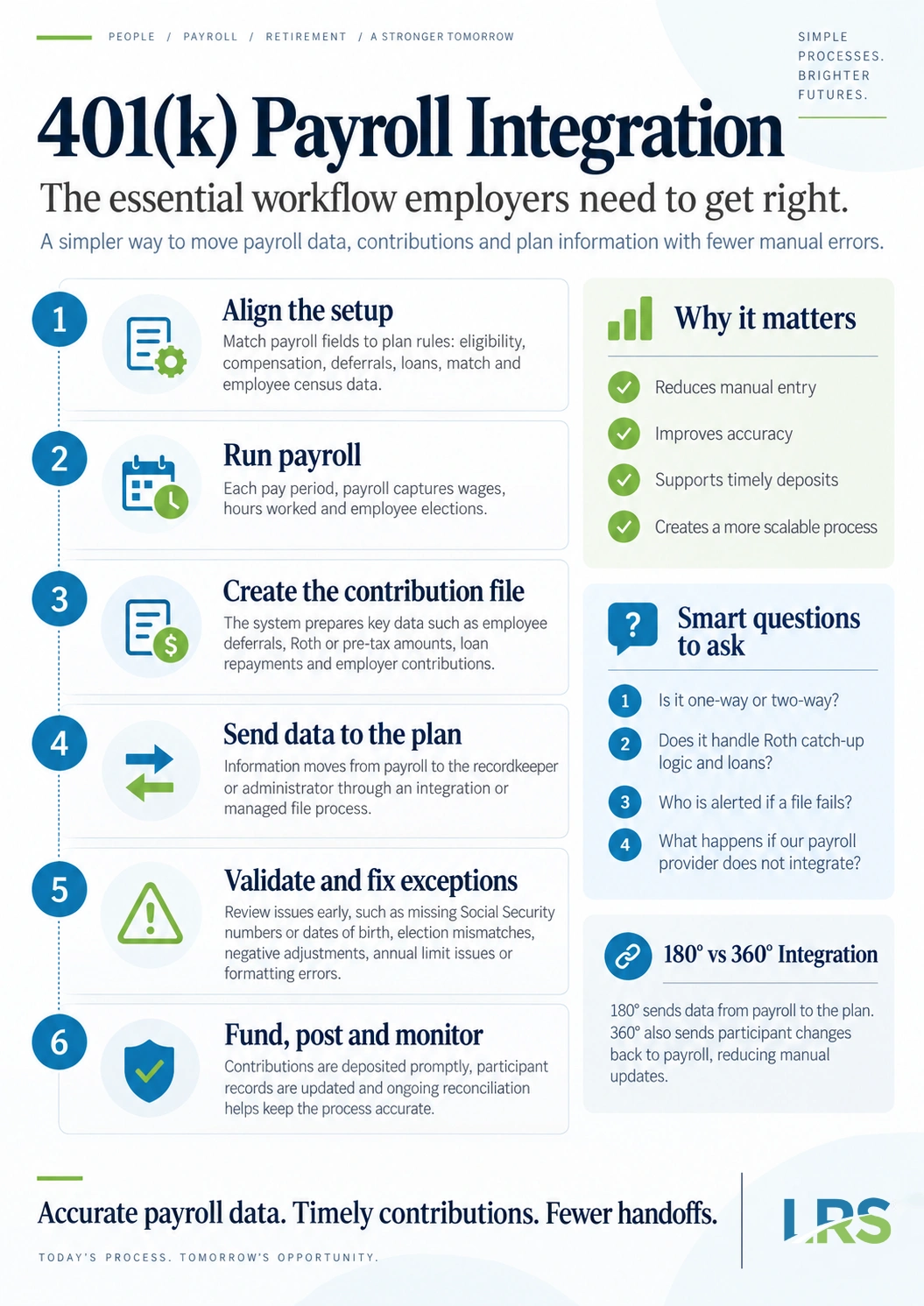
401(k) payroll integration is a direct connection between a company’s payroll system and its retirement plan recordkeeper, so that deferral amounts, loan repayments and census data move between the two without anyone rekeying them. In a fully connected setup, payroll sends contribution data to the recordkeeper each pay period, and the recordkeeper sends deferral rate changes back to payroll.
Most descriptions of integration stop at convenience: fewer spreadsheets, less double entry, a shorter Monday morning. That is all true, and it is the least interesting part. The reason integration matters is that the gap between payroll and recordkeeping is where many correctable retirement plan failures begin. Contributions deposited late. Deferrals withheld at a rate the participant changed weeks ago. An employee who became eligible and was never told.
Each of those has a defined correction procedure, an excise tax, or both. Each of them also starts as a handoff between two systems that did not happen, or happened wrong.
This guide covers what integration actually is and the three ways a plan can be set up, the specific errors it prevents, the deposit rule most employers misread, three changes that have moved real work onto payroll since 2023, what implementation involves, and the questions worth asking a provider before you commit. The information here is educational and is not a substitute for advice on a specific plan.
What 401(k) Payroll Integration Actually Means
Payroll integration is used loosely to describe connecting payroll to almost anything: accounting, time and attendance, benefits administration. In a retirement plan context it means something narrower. It is the link between the system that calculates pay and the system that holds participant accounts.
Providers describe that link in degrees, and the difference decides how much manual work is left over.
180 degree integration
Data moves one way. Each pay period, payroll sends a contribution file to the recordkeeper containing deferral amounts, loan repayments and employer contributions. The recordkeeper processes the file, while funding is transmitted under the arrangement’s separate procedures.
What a 180 degree connection does not do is send anything back. When a participant logs into the recordkeeper’s site and changes their deferral from 4% to 8%, that change is entered into payroll separately. In most companies that falls to whoever handles HR, alongside everything else on their desk.
360 degree integration
Data moves both ways. Payroll sends the contribution file, and the recordkeeper sends back the changes participants make themselves: a new deferral percentage, a Roth election, a loan starting or ending, a contribution suspension. Routine data moves automatically, and the two systems stay in agreement without a separate reconciliation step, although employer review, approvals and exception handling may still be required.
No integration
Someone exports a report from payroll, reformats it to match the recordkeeper’s template, and uploads or emails it each pay period. A great many plans run this way and run fine. It also means every pay period depends on one person being available, remembering, and getting the format right. Vacations, resignations and busy weeks are all points where the schedule can slip.
| NO INTEGRATION | 180 DEGREE | 360 DEGREE | |
|---|---|---|---|
| Contributions sent to recordkeeper | By hand | Automatic | Automatic |
| Deferral changes sent back to payroll | By hand | By hand | Automatic |
| Rekeying required each pay period | Yes | Partly | No |
| Handles automatic escalation | Manual update | Manual update | Automatically |
| Watch point | A missed pay period | A stale deferral rate | A rejected file |
What actually travels in a contribution file
The file itself is less mysterious than it sounds. A typical contribution file carries, for each participant and each pay date:
- Pre-tax elective deferrals and Roth elective deferrals, kept separate
- Catch-up contributions where the participant is catch-up eligible
- Employer match, profit sharing, safe harbor or non-elective contributions
- Loan repayments, identified by loan
- Eligible compensation for the period, as the plan document defines compensation
- Hours worked, which matter for eligibility and vesting
- Status changes: new hires, terminations, rehires, leaves of absence
The compensation definition is worth flagging. Plans differ on whether bonuses, commissions, overtime, fringe benefits and severance count as eligible compensation, and payroll has to be configured to match whatever the plan document actually says. An integration built on a different compensation definition than the document uses will produce contributions that do not match the document, each pay period, until the configuration is corrected.
How Does Payroll Integration Reduce Retirement Plan Errors?
Late deposits
Without a scheduled file, the deposit depends on someone remembering to send it. One missed pay period is enough. Because withheld deferrals are plan assets the moment they are withheld, a late deposit is not a clerical slip. It is treated as the employer having had the use of money that belonged to the plan, which is a prohibited transaction carrying an excise tax and a correction obligation.
Deferrals withheld at the wrong rate
A participant raises their deferral from 3% to 10% on the recordkeeper’s website. Without a return feed, payroll continues withholding at 3% until the change is entered there. Every pay period that passes is a period in which the participant did not get the deferral they elected, and plans generally have to make that up. The correction typically involves a corrective contribution funded by the employer plus lost earnings, and the size of it scales with how long the mismatch ran.
This one is easy to miss because nothing looks broken. Payroll runs, contributions post, the file is accepted. The figure is simply out of date until somebody compares the two systems.
Employees who became eligible and were never enrolled
Hours worked sit in payroll and in connected timekeeping systems. Where they never reach the recordkeeper in a usable form, an employee who satisfied the plan’s age, service and hours conditions can go an entire year without being offered the chance to participate. That is a missed deferral opportunity, and it also has a defined correction.
The IRS lists all three among the most common problems it finds in its 401(k) Plan Fix-It Guide, and each has a prescribed correction method. In many cases the correction costs more than the file that would have prevented it, and it costs more the longer it runs.
How Fast Do 401(k) Contributions Have to Be Deposited?
That phrasing catches people out, because it is a behavioral standard rather than a calendar one. The Department of Labor looks at how quickly a given employer normally deposits and treats that as the benchmark. An employer that usually deposits in two days and then takes eleven has a late deposit on its hands, even though eleven days sounds reasonable in the abstract.
Is there a safe harbor for small plans?
Yes. Plans with fewer than 100 participants at the beginning of the plan year are treated as timely where deposits reach the plan within seven business days of the date the amounts were withheld. It is a genuine safe harbor: deposit inside seven business days and the question does not arise.
Plans with 100 or more participants have no equivalent. For those plans the general reasonableness standard is the only test, which in practice means the earliest date the employer has demonstrated it can achieve.
Is the fifteenth business day a deadline?
No, and this is the single most common misreading of the rule. The fifteenth business day of the month following the month of withholding appears in the regulation as an outer limit, not as a permission. The Department of Labor has been explicit that it is not a safe harbor. An employer that could reasonably have deposited on day three and chose to wait until day fifteen has made a late deposit, and the fact that it landed inside the outer limit does not help.
What does a late deposit actually cost?
More than most sponsors expect, and the direct cost is often the smallest part of it. Correcting a delinquent contribution generally involves:
- Depositing the contributions themselves
- Calculating lost earnings for the period of the delay and depositing those too
- Filing Form 5330 and paying the excise tax on the prohibited transaction
- Reporting the delinquency on the plan’s Form 5500
That last item has a consequence people underrate. Delinquent contributions are a reportable item on the Form 5500, which means the disclosure is public and stays attached to the plan’s filing history. For plans large enough to require an independent audit, deposit timing is something auditors test directly, and a pattern of late deposits tends to widen the scope of the audit rather than being noted and passed over.
The correction programs, and what changed in 2025
Delinquent participant contributions are the transaction most frequently corrected under the Department of Labor’s Voluntary Fiduciary Correction Program. Historically, using the program meant preparing and filing a full application and waiting for a no-action letter.
That changed on March 17, 2025, when an amended version of the program took effect adding a self-correction component. Where contributions reach the plan within 180 calendar days of the date they were withheld, and the lost earnings on them total $1,000 or less, a plan sponsor can now self-correct by calculating lost earnings with the Department’s online calculator and filing an electronic notice, rather than submitting a full application. Whether a particular failure qualifies depends on the facts, on the amounts involved, and on the plan not already being under investigation.
The self-correction route is a genuine simplification for small, isolated delays. It does not help with a pattern, and it does not apply where the lost earnings are larger. Correcting a late deposit is always more work than the file that would have prevented it.
Why Integration Matters More in 2026 Than It Did in 2023
Three changes from the SECURE 2.0 Act of 2022 have moved work that used to sit with the recordkeeper onto payroll. Each of them is difficult to run by hand, and together they have changed integration from a convenience into something closer to infrastructure.
Automatic enrollment and automatic escalation
Section 101 of SECURE 2.0 requires most 401(k) and 403(b) plans established after December 29, 2022 to enroll eligible employees automatically, beginning with the 2025 plan year. The initial deferral has to fall between 3% and 10% of compensation, and it increases by one percentage point each year to at least 10% and no more than 15%. Businesses with 10 or fewer employees, businesses in existence less than three years, church plans and governmental plans are generally excepted.
The practical consequence for payroll is that deferral rates now change without anyone electing anything. A new hire is enrolled at a rate they never chose. A year later that rate goes up on its own. Then it goes up again. Running that by hand across a growing workforce is possible, and it is exactly the kind of recurring manual task that eventually gets missed. Whether a specific plan is subject to the requirement depends on its plan document and its establishment date.
Long-term part-time employees
Employees who work at least 500 hours in two consecutive years now generally become eligible to make elective deferrals, even where they never satisfy the plan’s standard hours requirement. For an employer with seasonal staff, part-time staff or variable hour workers, that means tracking hours for a population the plan previously had no reason to watch, and long-term part-time eligibility turns on those hours.
Payroll or connected timekeeping and HR systems are often the primary sources of service-hour data. A plan whose payroll does not pass hours through has no reliable way to identify who crossed the threshold, and no way to know it missed someone until a later review finds it.
Roth catch-up contributions for higher earners
The $150,000 figure is the indexed threshold the IRS set in Notice 2025-67, applied to 2025 wages for the 2026 plan year. The underlying requirement comes from section 603 of SECURE 2.0, which added section 414(v)(7) to the Internal Revenue Code, and Treasury issued final regulations on it, Treasury Decision 10033, in September 2025.
This one runs through payroll for a specific reason. The wage figure that determines who is caught by the rule is FICA wages as defined at Internal Revenue Code section 3121(a), which appears in Box 3 of the Form W-2. Payroll is typically the primary source of that data.
Without a reliable process for identifying affected participants and communicating that information to the recordkeeper, the risk of contribution processing errors increases significantly. The wages also are not aggregated across unrelated employers, so the test is specific to the sponsoring employer, which is another detail that has to be handled where the payroll data sits.
State Retirement Mandates Run Through Payroll Too
There is a second reason payroll and retirement have become harder to keep separate, and it has nothing to do with SECURE 2.0.
More than twenty states have now enacted programs requiring employers above a certain size to either offer a qualifying retirement plan or facilitate payroll deductions into a state-run savings program. California’s CalSavers, OregonSaves, Illinois Secure Choice, Colorado SecureSavings and a growing list of others all work the same basic way: an employer that does not sponsor its own plan has to register, enroll employees, and run deductions through payroll into the state program.
Two consequences follow for employers. The first is that facilitating a state program is itself a payroll integration problem, with its own file, its own deadlines and its own registration requirements. The second is that sponsoring a qualifying retirement plan generally exempts an employer from the state program, which means many employers end up comparing the ongoing administrative load of a state facilitation against the load of running a plan of their own.
For multi-state employers the arithmetic gets harder quickly. An employer with staff in four states can face four separate programs with four sets of deadlines and thresholds, or one retirement plan. Requirements, employee count thresholds and deadlines differ by state and change as new programs come online, so it is worth checking the current position for each state where a company has employees.
Where Responsibility Sits When the Data Is Wrong
Integration changes how data moves between systems. It does not, on its own, settle who is answerable when a number is wrong.
Responsibility for an incorrect rate depends on the source of the error, the parties’ assigned duties, and the applicable service agreements. Under ERISA, the plan sponsor and the named fiduciaries carry the duty to run the plan prudently and in the interest of participants, and that duty is not discharged by the presence of an automated file. What each service provider is responsible for is set out in its own agreement and role.
What integration does is narrow the surface area. Fewer manual steps means fewer places for a number to change between systems, and a scheduled file means a missed transmission becomes visible rather than silent. Those are meaningful reductions in risk, and they work alongside the controls a sponsor keeps over source data rather than replacing them.
The Department of Labor’s guidance for plan sponsors on meeting fiduciary responsibilities is the clearest statement of what those duties involve, and it is worth reading once even for sponsors who have delegated most of the day to day work.
What Payroll Integration Does Not Do
Integration is a data connection rather than a compliance service. It moves numbers between two systems. It does not decide whether the numbers are right.
- It does not determine eligibility. Whether an employee has satisfied the plan’s age, service and hours conditions is a plan document question, and the document governs.
- It does not interpret the plan document. What counts as eligible compensation, how entry dates work, and how the plan defines a year of service are all set by the document rather than by the feed.
- It does not run compliance testing. Coverage, nondiscrimination and top heavy testing are separate annual work performed on the data after the fact.
- It does not correct source data. An integration configured against a different compensation definition than the plan document uses will transmit that figure each pay period until the configuration is corrected.
This is where plan administration and recordkeeping work alongside an integration rather than being replaced by one. The connection handles transmission. The administrator, the recordkeeper and the employer each hold part of what makes the result correct.
What Payroll Integration Costs
There is no single answer, because the cost can sit on either side of the connection and sometimes on both. Some payroll providers include integration in an existing service tier. Others charge a one-time setup fee, a per-file fee, or a monthly amount tied to headcount. Recordkeepers vary the same way.
Three things tend to drive the number. The first is whether the connection already exists between the two specific systems or has to be built, which is a very different piece of work. The second is the condition of the existing census data. The third is headcount, since most pricing scales with participants rather than with contribution volume.
It is worth asking both the payroll provider and the recordkeeper directly, and asking what happens to the price if headcount grows. It is also worth weighing against what the current process costs, which is rarely zero once the hours spent on it are counted alongside the cost of the corrections it eventually produces.
How Payroll Integration Gets Set Up
Implementation is a configuration project rather than a software installation. A typical build runs in five steps.
- Confirm the pairing.The payroll system and the recordkeeping platform have to support a connection with each other specifically, not integrations in general. This is where a surprising number of projects stop.
- Map the fields.Compensation definitions, deferral types, loan repayments and employer contributions each need a home on both sides. This is the step where the plan document has to be read carefully rather than assumed.
- Reconcile the census.Names, dates of birth, hire dates, termination dates and hours are compared between systems and corrected. On an older plan this is routinely the longest part of the project.
- Run a parallel period.One or two pay cycles are processed both ways and the results compared before the manual process is retired. Skipping this is how a mapping error becomes a year of wrong contributions.
- Set the exception process.Somebody has to own what happens when a file rejects, and find out within a day rather than at quarter end.
Implementation timing varies based on provider compatibility, data quality, testing, and the parties’ processes.
Does Your Payroll Provider Integrate With Your 401(k) Plan?
This is the question most employers are actually asking, and the answer depends on the pairing rather than on the payroll provider alone. A payroll company may support a full two way connection with one recordkeeper, a one way file with another, and nothing at all with a third. “We integrate with 401(k) providers” and “we integrate with your 401(k) provider” are different statements.
Leading Retirement Solutions supports integrations with a range of payroll and HCM systems. Among the systems employers ask about most, Proliant and Namely connect on a one way basis and Wurk connects both ways. The payroll partner directory carries the full current list for both levels, and it is the version to check, since connections are added and providers change their own systems.
Where a payroll system is not currently integrated, LRS is open to discussing potential integration solutions and can work with an employer to explore options for connecting their payroll system and 401(k) plan. A system that does not appear on the directory today is worth asking about rather than ruling out. For a system-by-system view of the ones employers ask about most, see which payroll providers integrate with a 401(k).
Employers in regulated industries, including cannabis businesses, often work with a narrower set of payroll options than the general market, and the directory marks which systems serve those employers.
What to ask before you commit
- Is the connection one way or two way, and what specifically travels in each direction?
- Does it carry Roth deferrals and loan repayments, or only pre-tax deferrals?
- Can it pass prior year FICA wages so catch-up contributions route correctly under the 2026 Roth rule?
- Can it handle automatic escalation without someone updating rates by hand each year?
- Does it pass hours worked, which eligibility and vesting depend on?
- Which compensation definition is it configured against, and does that match the plan document?
- Who owns a failed file, how quickly is a failure flagged, and to whom?
- Is there a setup fee, an ongoing fee, and does either change with headcount?
If your payroll provider does not integrate
Changing payroll providers purely to gain an integration is not always the right trade. Payroll touches far more than the retirement plan, and a switch has its own cost and its own risk. Leading Retirement Solutions offers enhanced payroll support services, which prepare and transmit the contribution file each pay period on the employer’s behalf.
When a Contribution File Fails
Files fail, and a connection nobody is monitoring gives up much of the benefit of having one. The common causes are unglamorous:
- A new hire missing a date of birth or a Social Security number
- A participant with a deferral election the recordkeeper has no record of
- A negative contribution from a payroll correction or a reversed check
- A contribution that exceeds an annual limit partway through the year
- A formatting change on either side after a system update
A rejected file may delay posting or funding, depending on how the integration and money movement are structured, and the deposit timing rule continues to run in the meantime. That is the reason the exception process matters as much as the connection.
A reasonable arrangement names one person on the employer side and one on the provider side, sets an expectation for how quickly a rejection is reported, and defines what happens next. It is a short conversation that is much easier to have before the first failure than after it. Where a notice arrives from an agency, a notice from the IRS or DOL explains what that generally involves.
401(k) Payroll Integration: Common Questions
What is the difference between 180 and 360 payroll integration?
A 180 degree integration sends contribution data one way, from payroll to the recordkeeper. A 360 degree integration also sends changes back the other way, so a deferral rate a participant updates online reaches payroll without anyone retyping it. The practical difference is whether someone still has to maintain deferral rates by hand.
How quickly do 401(k) contributions have to be deposited?
As soon as they can reasonably be segregated from the employer’s general assets, under 29 CFR 2510.3-102. Plans with fewer than 100 participants have a seven business day safe harbor. Larger plans have no safe harbor, and the test is what the employer could reasonably have done.
Is the fifteenth business day a deposit deadline?
No. It is an outer limit rather than a safe harbor. A deposit made on the fifteenth business day can still be late if the employer could reasonably have made it sooner, and the Department of Labor has been explicit on this point.
Does payroll integration cost extra?
It depends on both the payroll provider and the recordkeeper. Some include the connection at no additional charge, others apply a setup fee or a per-file fee. It is worth asking both sides, because the cost can sit with either one and sometimes with both.
Can I integrate payroll with a plan I already have?
Usually yes. Integration is configured between the payroll system and the recordkeeper and does not generally require starting a new plan. What it does require is that those two specific systems support a connection with each other.
Does integration handle the 2026 Roth catch-up rule?
Only where the payroll system can identify affected participants and pass that information through to the recordkeeper. Not every connection does. Since the rule took effect on January 1, 2026 and payroll is typically the primary source of the wage figure, this is worth confirming directly rather than assuming.
What happens if a contribution file fails?
A rejected file may delay posting or funding, depending on how the integration and money movement are structured, and the deposit timing rule continues to run in the meantime. How quickly a failed file is flagged, and who is responsible for catching it, is one of the more useful questions to ask a provider before signing.
Do I have to switch payroll providers to get integration?
No. Where a payroll provider does not connect to the recordkeeper, a payroll support service can prepare and transmit the contribution file each pay period instead. That keeps the existing payroll relationship while removing the manual step.
Does integration cover employer contributions as well as deferrals?
Generally yes. A contribution file normally carries employer match, safe harbor and profit sharing amounts alongside employee deferrals, though how and when employer contributions are calculated varies by plan design and by how frequently the plan funds them.
What happens to integration when we change payroll providers?
The connection has to be rebuilt with the new provider, including field mapping and a fresh census reconciliation. It is worth confirming that the incoming provider connects to your recordkeeper before the switch rather than after, because discovering otherwise mid-transition is expensive.
Does payroll integration help with state retirement mandates?
Facilitating a state program is its own payroll deduction process with its own file and deadlines. Sponsoring a qualifying retirement plan generally exempts an employer from the state program, so many employers weigh the two administrative loads against each other.
Who is responsible if the integration sends the wrong number?
Responsibility depends on the source of the error, the parties’ assigned duties, and the applicable service agreements. The plan sponsor and named fiduciaries retain their duties under ERISA regardless of how the data moves, which is why the configuration and the compensation definition behind the file matter alongside the connection itself.
Getting Payroll and the Plan Connected
Whether a plan already has an integration, needs one built, or sits with a payroll provider that does not connect at all, the starting point is the same question: which system holds which data, and where does the handoff currently break?
That is usually a short conversation. The answer determines whether the fix is a configuration change, a new connection, or a support service that handles the file each pay period without disturbing the payroll relationship.
Sources
Every regulatory statement above traces to one of the following. Links were verified at the time of writing.
- Code of Federal Regulations29 CFR 2510.3-102, definition of plan assets and participant contributionsWhen withheld contributions become plan assets, and the seven business day safe harbor for plans with fewer than 100 participants.
- U.S. Department of LaborVoluntary Fiduciary Correction ProgramThe program used to correct delinquent participant contributions, and the relief it provides.
- Federal RegisterVoluntary Fiduciary Correction Program, 2025 amendmentsThe self-correction component effective 17 March 2025, and the conditions that apply to it.
- Internal Revenue Service401(k) Plan Fix-It GuideThe IRS catalogue of common operational failures, including missed deferrals and eligibility errors, with the correction method for each.
- U.S. Department of LaborMeeting Your Fiduciary ResponsibilitiesWhat the plan sponsor’s duty involves, and why an automated file does not move it.
- Internal Revenue ServiceNotice 2025-67The indexed $150,000 wage threshold that determines who must make catch-up contributions on a Roth basis for 2026.
- United States Code26 U.S.C. 414, including section 414(v)(7)The catch-up contribution rules, including the Roth requirement added by SECURE 2.0 section 603.
- United States Code26 U.S.C. 3121, definition of wagesThe FICA wage definition the Roth catch-up test runs on, reported in Box 3 of the Form W-2.
Reviewed by the LRS compliance team in September 2026. Provided for general information only and not legal or tax advice. Integration arrangements, plan terms and correction options depend on the facts of each plan; confirm your situation with your plan administrator and advisors before acting.