Plan Research Guide · Updated October 2026
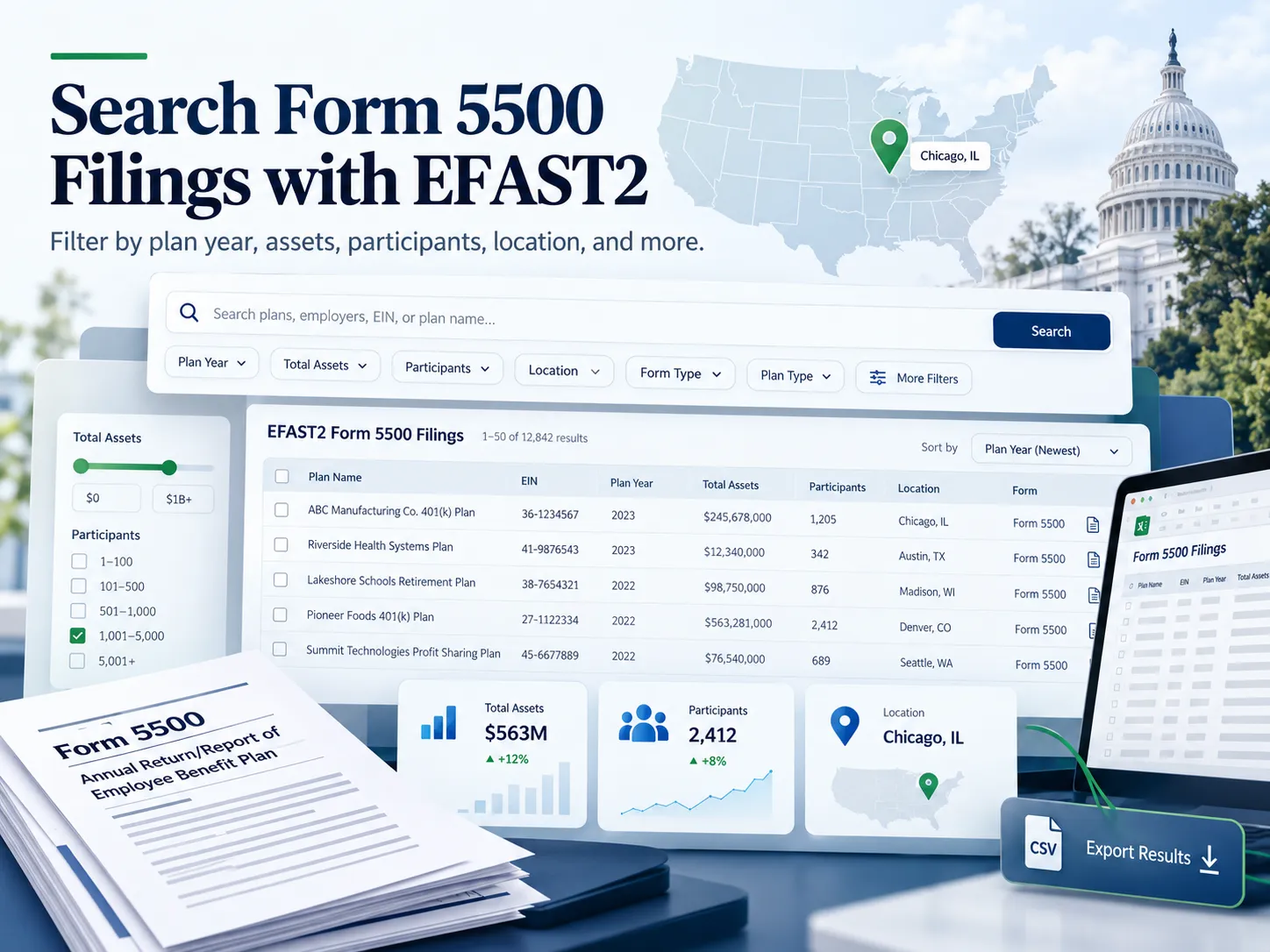
Beyond looking up one plan, the Department of Labor’s EFAST2 Form 5500 Search can filter filings by plan type, assets, participants, business code, location, and year, and export the results to a spreadsheet. Most filters correspond to information reported on the filed form, so the same map that drives the search also helps explain how to read the filing it returns.2
This guide covers the tool’s filters and data options and how to read a filing line by line. For the basics of looking up one company’s plan by name, EIN, or acknowledgment ID, including search operators and why a plan may not appear, see our guide to searching Form 5500 filings by company name.
- EFAST2’s filters let a search cover groups of plans rather than one plan, and they can be combined to narrow the results step by step.
- Assets, participants, business codes, and ZIP codes accept ranges, and the results can be exported to a CSV file.
- The search shows only the latest filing for each plan year, and attachments may appear later than the forms and schedules.
- Most filters and search fields correspond to information reported on the Form 5500 or Form 5500-SF, which makes a downloaded filing easier to read.
- Schedule H and Schedule I include questions in Part IV about a plan’s financial reporting and operations. A “Yes” answer reports that a particular event, condition, or circumstance existed during the reporting year. The filing alone may not provide the full context, outcome, or any corrective actions taken.
How EFAST2 Search Results Work
ERISA provides for annual reports filed with the Department of Labor to be made available for public inspection, and the EFAST2 Form 5500 Search is where that access generally happens today.1, 5 A few rules about how the results are assembled explain most of what a researcher sees.
| Rule | What it means for a search | Source |
|---|---|---|
| Latest filing only | Since March 28, 2023, the results show only the latest filing for each plan year. If a plan filed an amended return, the amended version is the one that appears. | DOL2 |
| Attachment timing | Forms and schedules generally appear within hours of a successful filing, while attachments may take up to 21 days to become publicly available. | DOL3 |
| Result limit | Up to 5,000 filings are displayed for any search, across multiple pages. Larger result sets can be narrowed with filters. | DOL2 |
| Results count | The count under the search box shows how many filings matched, and the numbers beside each filter show how many filings fall in each category. | DOL2 |
| Sorting and download | Columns can be sorted, and each filing downloads as a ZIP archive containing the PDF. | DOL2 |
As described on the Department of Labor’s search help page and EFAST2 FAQs. Features may change.
How to Use the EFAST2 Filters
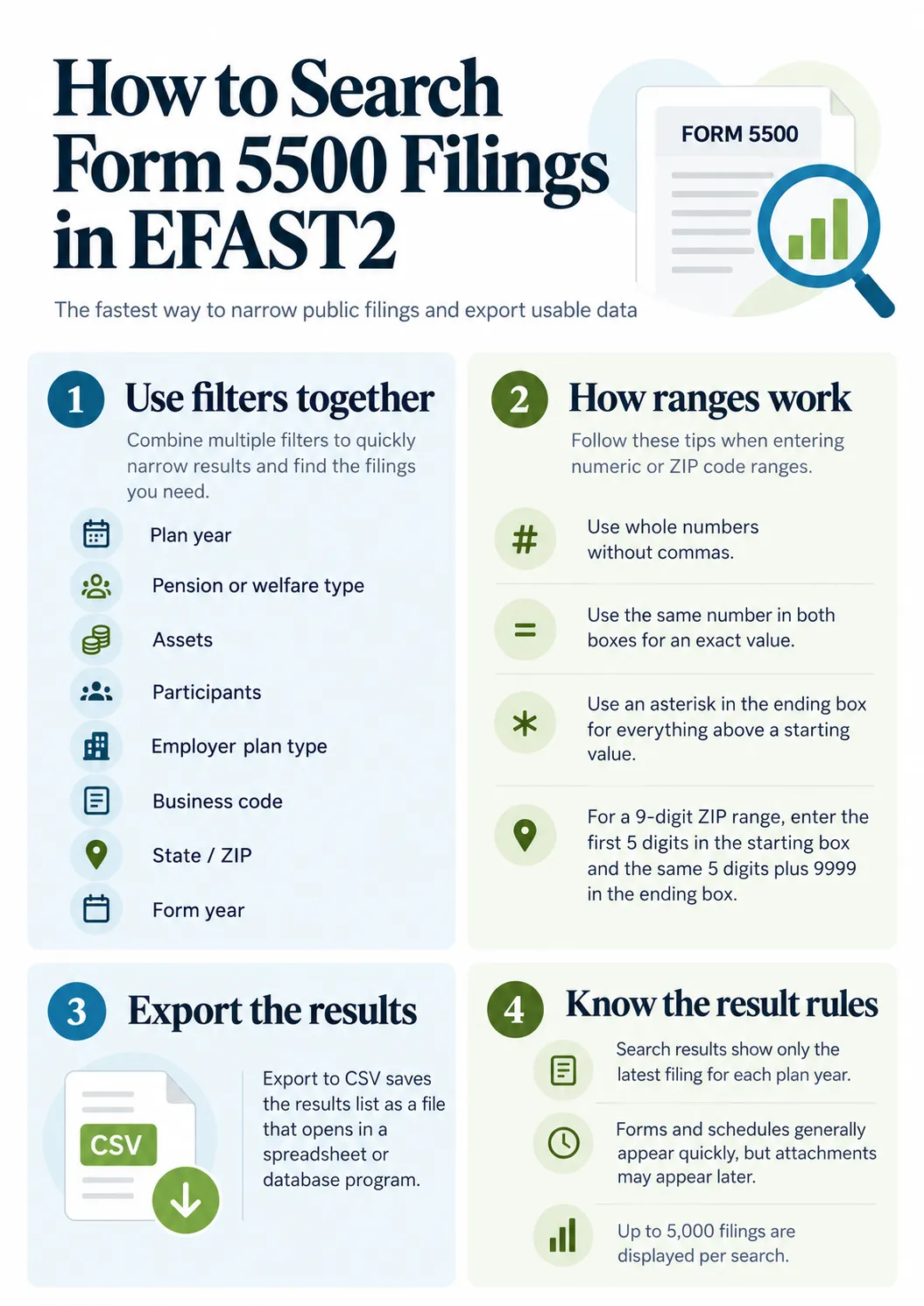
The filters let you search for groups of filings rather than one plan. They appear under Show Filters, and most correspond to information reported on the Form 5500 or 5500-SF.2
| Filter | What it narrows by | Where it is reported |
|---|---|---|
| Plan Years | The plan year of the filing | Part I |
| Pension types | Defined benefit, defined contribution, and other pension features | Form 5500 line 8a; Form 5500-SF line 9a |
| Welfare Benefit Types | Types of welfare benefits provided | Form 5500 line 9b; Form 5500-SF line 9a |
| Assets | A range of plan asset values | Schedule H line 1f, Schedule I line 1a, or Form 5500-SF line 7a |
| Participants | A range of participant counts | Form 5500 line 6a(2); Form 5500-SF line 5b |
| Employer Plan Types | Single-employer, multiemployer, and similar plan entities | Part I, line A |
| Business Codes | The sponsor’s principal business activity code | Part II, line 2d |
| States, foreign locations, ZIP code | The sponsor’s address | Part II, line 2a |
| Form Years | The form year printed on the filing | Top right corner of the form |
Filter names and line references as the Department of Labor maps them on the search help page.
Entering ranges
Assets, participants, business codes, and ZIP codes accept a range. The Department of Labor’s help page describes how to enter one:2
Enter whole numbers without commas.
For an exact number, enter the same number in both the starting and ending boxes.
For everything above a starting value, place an asterisk in the ending box.
For a full nine-digit ZIP code range, enter the first five digits in the starting box and the same five digits followed by 9999 in the ending box.
Filters and the search box work together. Each filter you add narrows the results further, and each one appears under the search bar, where it can be removed to widen the search again.2 For example, a researcher studying plans in one region could combine a state filter, a participant range, and a plan year.
Exporting results
The Export to CSV button saves the results list as a comma-separated file that opens in a spreadsheet or database program, with several fields of data for each filing.2 For larger projects, the Department of Labor also publishes full structured datasets, covered later in this guide.
Searching for Plans in a Group or Pooled Arrangement
Some filings cover more than one plan, and they are found a little differently.
How to Read a Form 5500 Filing
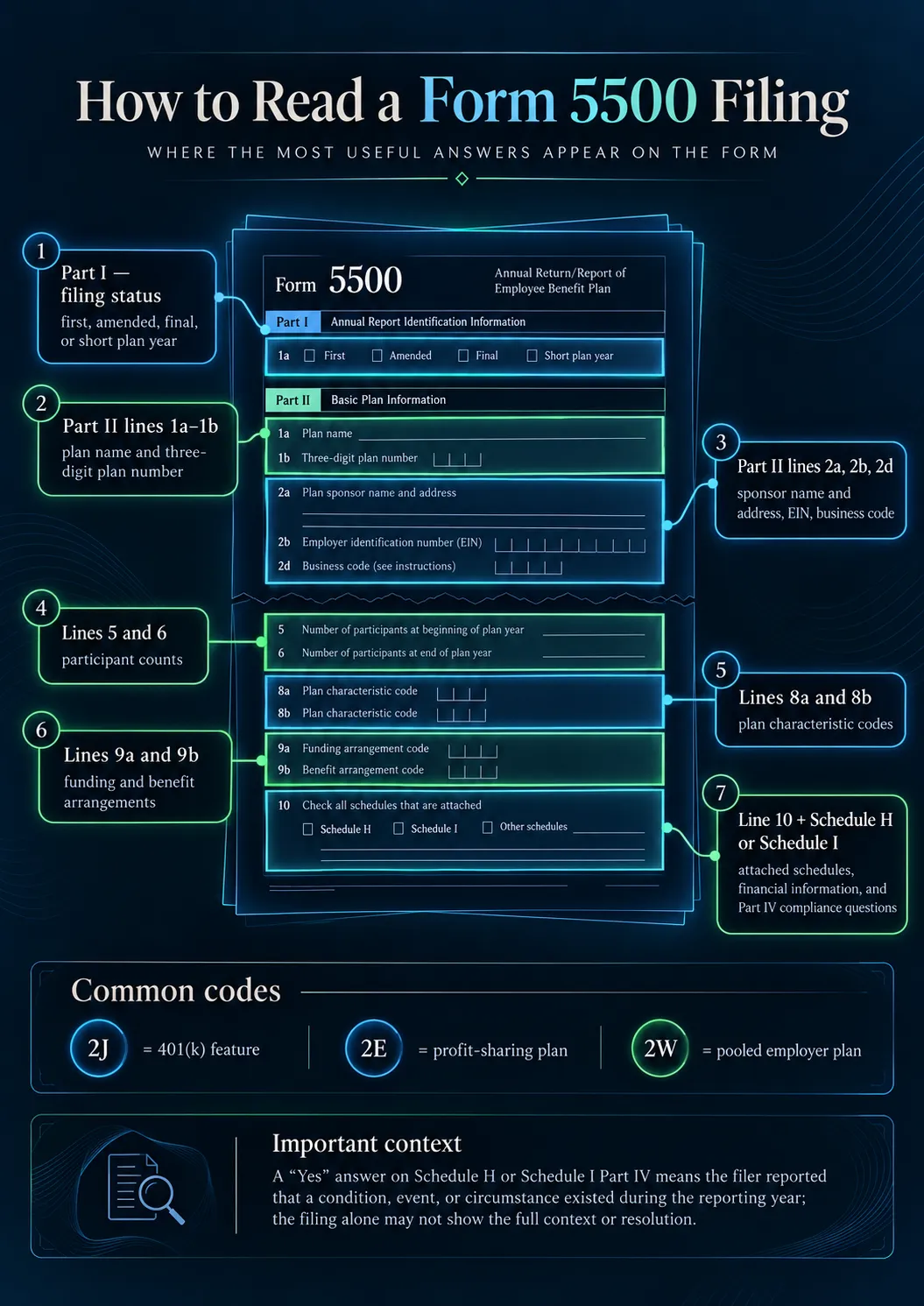
The first pages of a Form 5500 identify the plan and summarize it, and the schedules carry most of the financial and operational detail. The map below shows where common questions are answered on the full Form 5500. The forms and instructions for each year are published on the Department of Labor’s Form 5500 page.4, 11
| What you want to know | Where to look | What it shows |
|---|---|---|
| Which plan this is | Part II, lines 1a and 1b | The plan name and three-digit plan number |
| Who sponsors it | Part II, lines 2a, 2b, and 2d | The sponsor’s name and address, EIN, and business code |
| The status of the filing | Part I | Whether it is a first, amended, final, or short plan year return |
| How many participants | Lines 5 and 6 | Participant counts at the beginning and end of the year, by category |
| Participants with balances | Line 6g | For defined contribution plans, participants with account balances |
| What kind of plan it is | Lines 8a and 8b | Plan characteristic codes for pension and welfare features |
| How benefits are funded | Lines 9a and 9b | Funding and benefit arrangements, such as a trust or insurance |
| Which schedules are attached | Line 10 | A checklist of the schedules filed with the return |
Line references are from the instructions for the Form 5500. The Form 5500-SF reports similar information on the form itself, with its own line numbers.
Line 10 lists the schedules attached to the filing. What each schedule covers, and which plans attach it, is explained in our guide to Form 5500 filing requirements. Two of them matter most for reading a filing: Schedule H and Schedule I, which carry the plan’s financial information and the compliance questions covered below.4
Plan characteristic codes
Lines 8a and 8b use codes to describe a plan’s features. A single plan often reports several. These are among the codes a reader is most likely to see.4
| Code | What it indicates |
|---|---|
| 2A | Age or service weighted, new comparability, or similar allocation |
| 2E | Profit-sharing plan |
| 2F | ERISA section 404(c) plan |
| 2G | Total participant-directed account plan |
| 2J | Code section 401(k) feature |
| 2R | Participant-directed brokerage accounts offered as an investment option |
| 2S | Automatic enrollment of elective contributions |
| 2T | Default investment account for participants who do not direct their accounts |
| 2W | Pooled employer plan |
| 3D | Pre-approved pension plan |
| 1I | Frozen defined benefit plan, with no new benefit accruals |
Selected codes from the list of plan characteristic codes in the Form 5500 instructions. The full list includes many more.
Compliance Questions Worth a Closer Look
Schedule H and Schedule I each include questions in Part IV about a plan’s financial reporting and operations. These questions are part of how a plan reports its operations for the year. A “Yes” answer reports that a particular event, condition, or circumstance existed during the reporting year, often with an amount and a supporting schedule. The filing alone may not provide the full context, outcome, or any corrective actions taken. Understanding what each question asks makes a filing much easier to interpret.4
| Schedule H line | What the question asks | What the reported answer or entry indicates |
|---|---|---|
| Line 3a | The type of opinion the independent accountant issued | Whether the opinion was unmodified, qualified, a disclaimer, or adverse. ERISA section 103 provides for the accountant’s report, which explains the basis.6 |
| Line 4a | Whether the filer reported participant contributions as not having been transmitted to the plan within the applicable time period | An amount is reported, along with a schedule of the contributions. The governing rule is in 29 CFR 2510.3-102.8 |
| Lines 4b and 4c | Whether loans, fixed income obligations, or leases were in default or classified as uncollectible | Details appear on Schedule G. |
| Line 4d | Whether a nonexempt transaction with a party in interest occurred | Details appear on Schedule G. |
| Line 4e | Whether the plan was covered by a fidelity bond | The amount of coverage is reported. Bonding rules are in 29 CFR Part 2580.9 |
| Line 4f | Whether the plan suffered or discovered a loss from fraud or dishonesty | The amount of the loss is reported, even if it was reimbursed. |
| Lines 4g and 4h | Whether the plan held assets without a readily determinable value, or received noncash contributions, that were not valued by an independent appraiser | The value of those assets or contributions is reported. |
| Line 4i | Whether the plan had assets held for investment | Schedules of those assets are attached, under 29 CFR 2520.103-11.10 |
| Line 4l | Whether any benefits were not paid on time or not paid in full | An amount is reported. |
| Lines 4m and 4n | Whether there was a blackout period, and whether the required notice was provided | Answers relate to temporary restrictions on participant account activity. |
Line letters shown are from Schedule H. Schedule I asks a similar set of questions, and some of its line letters differ.
The compliance questions describe what happened during one plan year. Whether an item was resolved, and how, may not be visible from the filing alone, and the answers for a particular plan depend on that plan’s documents and facts. For the plan’s own sponsor, our guide to the ERISA fidelity bond and our guide to IRS and DOL retirement plan notices cover two of the topics these questions touch most often.
Bulk Data and Structured Datasets
The search tool is built for finding individual filings. For research across many plans or years, the Department of Labor offers other routes.2, 7
| Resource | What it provides |
|---|---|
| Form 5500 Datasets | Structured data from filed Form 5500 and 5500-SF forms and schedules, but not attachments. The 2009 and later datasets are typically updated around the first of each month. |
| Datasets for 2008 and earlier | Complete datasets that will not change, organized by plan year rather than form year |
| Bulk Image service | Bulk downloads of filed returns in PDF format, intended for developers automating downloads, available by request to the Department of Labor |
| FOIA requests | Datasets before 1999 and custom datasets, which may involve a fee |
Each 2009 and later dataset represents the form year printed on the filing, which can differ from the plan year a researcher has in mind.7
Need Help Preparing Your Plan’s Form 5500 Filing?
Form 5500 preparation and filing support are among the plan administration services Leading Retirement Solutions provides to plan sponsors.
Frequently Asked Questions
How do I search for all Form 5500 filings in one state or ZIP code?
Open Show Filters and use the States/Territories or ZIP Code filter, which draws on the sponsor’s address on Part II, line 2a. ZIP codes accept a range, and adding a plan year or participant range narrows the results further.
Can I search Form 5500 filings by plan size?
Yes. The Assets and Participants filters accept ranges. Enter whole numbers without commas, use the same number in both boxes for an exact value, or place an asterisk in the ending box for everything above a starting value.
Can I export Form 5500 search results?
Yes. The Export to CSV button saves the results list as a comma-separated file that opens in a spreadsheet or database program, with several fields of data for each filing.
Why does only one filing show for a plan year?
Since March 28, 2023, the search shows only the latest filing for each plan year. If a plan filed an amended return, the amended filing generally replaces the original in the results.
How soon does a new filing appear in the search?
According to the Department of Labor, forms and schedules generally appear within hours of a successful filing, while attachments may take up to 21 days to become publicly available.
How do I find a plan that files as part of a DCG?
Search by the plan’s sponsor name, plan name, or EIN, and optionally its plan number. The group filing appears marked with an asterisk, and searching the downloaded PDF for the same EIN or plan number leads to that plan’s Schedule DCG.
What are plan characteristic codes on Form 5500?
They are codes entered on lines 8a and 8b to describe a plan’s features, such as 2J for a 401(k) feature, 2E for a profit-sharing plan, or 2W for a pooled employer plan. The full list is in the Form 5500 instructions.
What does a “Yes” on Schedule H line 4a mean?
It indicates that the filer reported participant contributions as not having been transmitted to the plan within the applicable time period during the year, along with the amount. The filing alone may not provide the full context, outcome, or any corrective actions taken.
Where can I get Form 5500 data in bulk?
The Department of Labor publishes structured Form 5500 datasets, generally updated around the first of each month, and offers a bulk image service for PDF filings on request. Custom datasets may be requested through the Freedom of Information Act and may involve a fee.
Related Reading
- How to search Form 5500 filings by company name, for looking up one plan and understanding what the form is.
- Form 5500 filing requirements, on schedules, exemptions, and audit requirements.
- ERISA fidelity bonds, the subject of Schedule H line 4e.
- IRS and DOL retirement plan notices, and what to do when one arrives.
Sources
Every substantive statement above is drawn from the following primary sources. Numbers in the text refer to this list. Links were verified at the time of writing.
- U.S. Department of Labor, EFAST2Form 5500 Series Search
- U.S. Department of Labor, EFAST2Form 5500 Search Help
- U.S. Department of Labor, EBSAFAQs on the EFAST2 electronic filing system
- U.S. Department of LaborInstructions for Form 5500, 2025
- U.S. Code29 U.S.C. §1024, Filing with Secretary and furnishing information to participants (ERISA §104)
- U.S. Code29 U.S.C. §1023, Annual reports (ERISA §103)
- U.S. Department of Labor, EBSAForm 5500 Datasets
- Code of Federal Regulations29 CFR §2510.3-102, Definition of plan assets: participant contributions
- Code of Federal Regulations29 CFR Part 2580, Temporary bonding rules
- Code of Federal Regulations29 CFR §2520.103-11, Assets held for investment purposes
- U.S. Department of Labor, EBSAForm 5500 Series forms and instructions
About Leading Retirement Solutions. Leading Retirement Solutions is a Seattle-based third-party administrator that has designed, administered, and corrected retirement plans for employers across the country since 2017, including the Leading Cannabis 401(k)®. Form 5500 preparation, large plan audit support, and filing correction support are part of the administration work we do.
Provided for general information only and not legal, tax, or investment advice. Search features and data availability are determined by the Department of Labor and may change. What a particular filing shows, and what any reported item means for a plan, depends on that plan’s documents and circumstances.