

Retirement Plan Research Guide · Updated July 2026
The quick answer
To search Form 5500 filings by company name, go to the free EFAST2 database at efast.dol.gov, open the Form 5500 Series Search, and enter the plan name, plan sponsor, or Employer Identification Number (EIN). Every Form 5500 and 5500-SF filed since 2009 is public, and you can view or download each filing as a PDF at no cost.
Almost every private-sector retirement and health plan in the country files an annual report called the Form 5500. It is one of the most transparent records in American finance: the U.S. Department of Labor publishes the filings for roughly 844,000 plans, covering about 158 million workers and retirees and nearly $13 trillion in assets. If you know where to look, you can pull the annual report for almost any employer’s 401(k) in a couple of minutes.
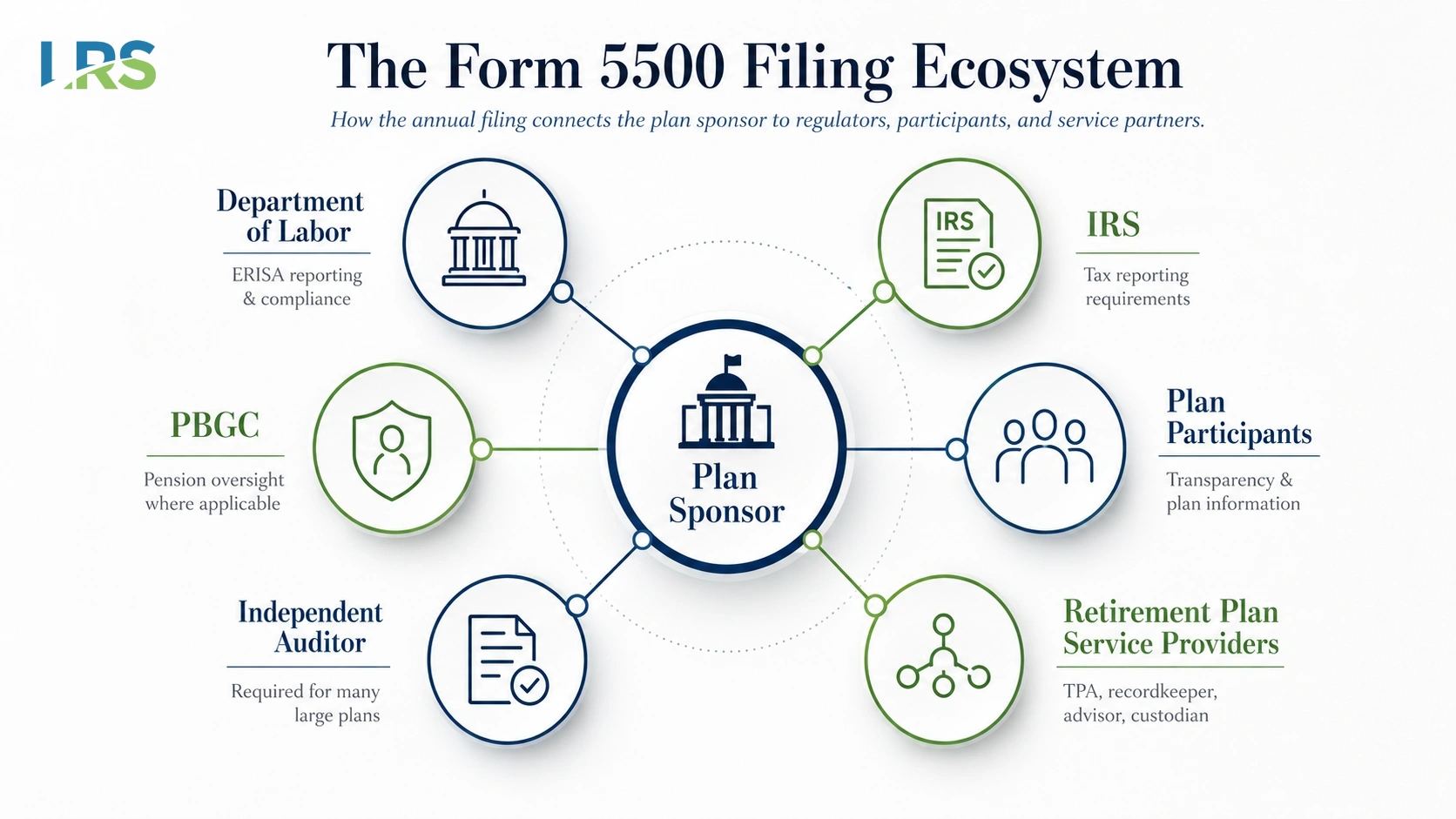
People search for a Form 5500 for all kinds of reasons. An employee wants to confirm the health of a workplace 401(k). A financial advisor is researching a prospect’s plan. An M&A or benefits team is running due diligence. A plan sponsor simply needs a copy of a filing their prior provider submitted. This guide walks through exactly how to find and read a Form 5500, why some plans never show up in the public search, and what the numbers on the filing actually tell you.
How to Search Form 5500 Filings on EFAST2
The only official, free, and complete source of Form 5500 filings is the government’s EFAST2 system – the ERISA Filing Acceptance System run by the Department of Labor’s Employee Benefits Security Administration. Third-party sites generally repackage the same public data, sometimes with additional search features or analytics. For many users, the EFAST2 database provides the information needed at no cost.
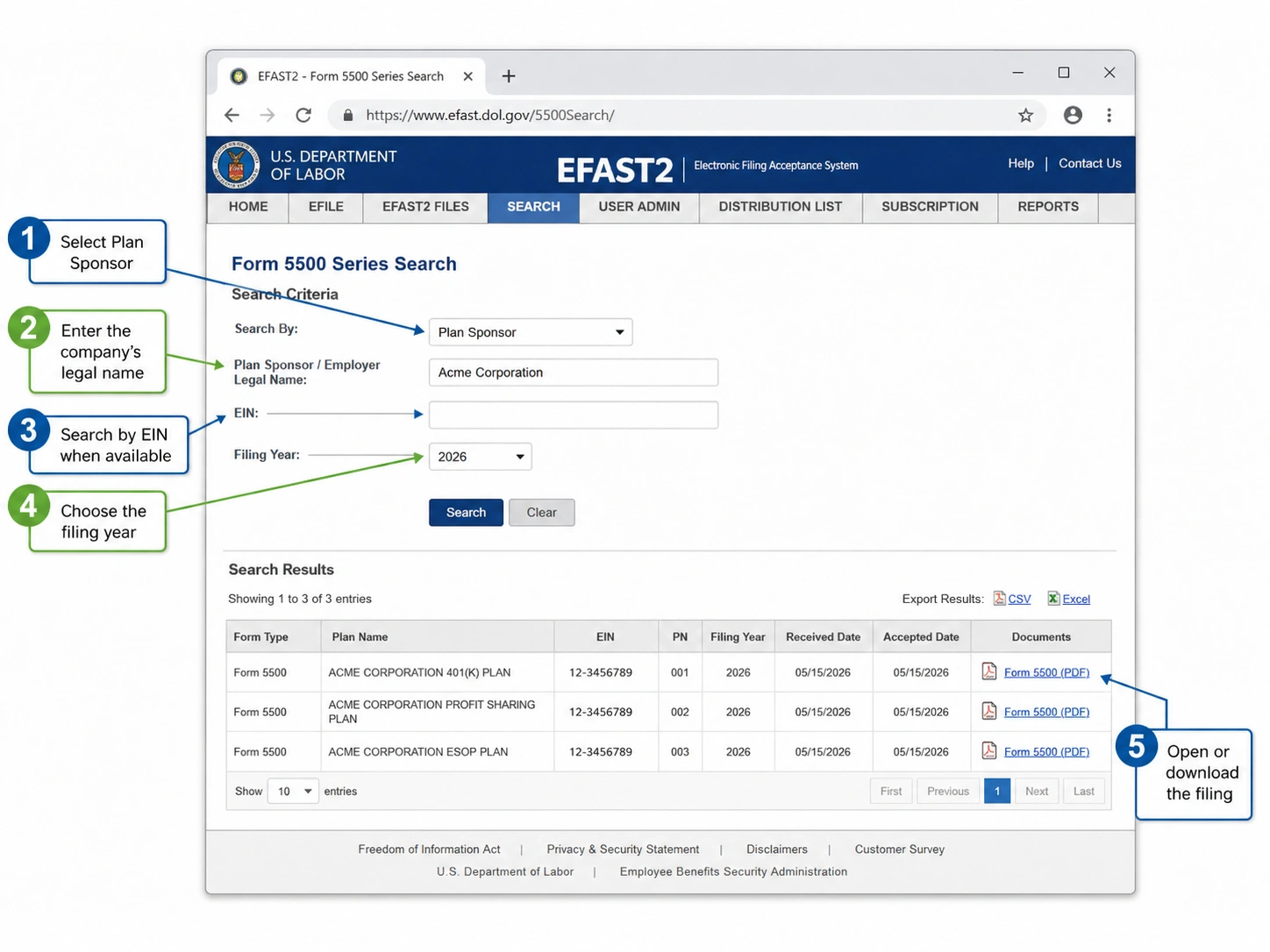
Open the official search tool
Go to efast.dol.gov and select Form 5500 Series Search. You do not need an account, a login, or any credentials to search or download filings. Credentials are only required for employers who are submitting a filing, not for the public looking one up.
Choose how you want to search
The search box defaults to Plan Name, but you can switch the field using the dropdown to search by any of the following:
- Plan Sponsor – the legal name of the employer or organization that maintains the plan. This is usually the most reliable way to search by company name.
- Plan Name – the plan’s own name, which is often the company name followed by “401(k) Plan.”
- EIN – the sponsor’s nine-digit Employer Identification Number. With or without the hyphen both work. This is the most precise search when you have it.
- Acknowledgement ID (AckID) – the receipt number assigned to a specific filing, useful when you are confirming one exact submission.
Use search operators to narrow the results
Company names are rarely entered into filings the way you would guess. A few simple operators make the difference between zero results and the right one:
- Asterisk (*) broadens a term. Typing
acme*returns Acme, Acme Corp, and Acme Industries in one pass. - Double quotes force an exact phrase.
"acme widget plan"returns only filings with that exact name. - A leading hyphen (-) excludes a word, which helps when a common company name is buried under similarly named plans.
The search is case-insensitive and matches all the words you enter in any order, so start broad and tighten from there.
Open and download the filing
Results list every electronically filed Form 5500 and 5500-SF for that plan, organized by plan year. Click the download arrow next to the year you need and the full filing, including its schedules, opens as a PDF you can save or print. Most plans have a filing for every year going back to 2009, when the all-electronic EFAST2 system began.
Can’t Find a Plan? The Reasons a Form 5500 Won’t Show Up
If a plan does not appear in the search results, there are several common explanations to consider. Work through these before assuming a filing does not exist.
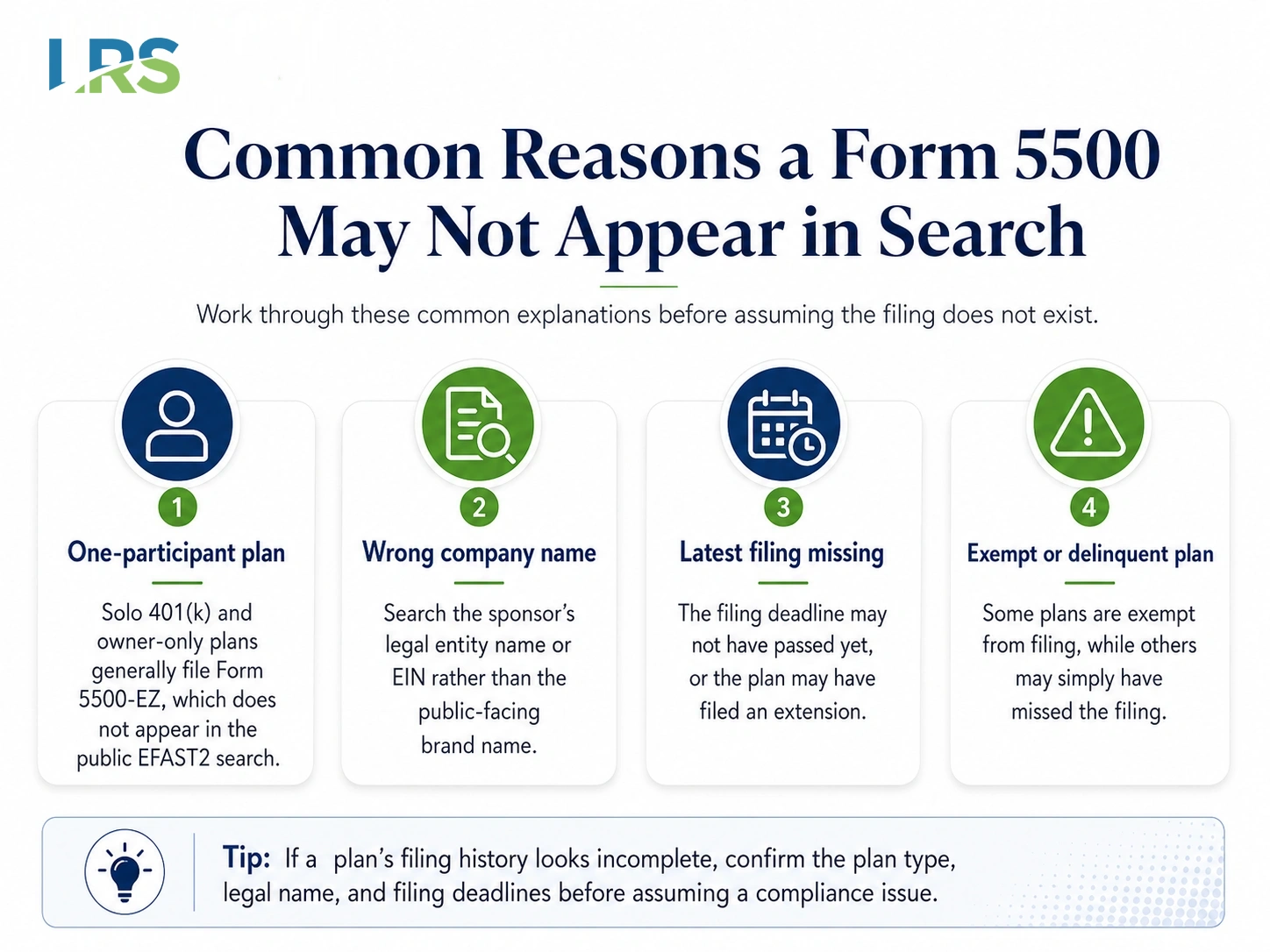
Most common reason
One-participant plans are not public. Solo 401(k) plans and owner-and-spouse plans file the Form 5500-EZ. Even though the 5500-EZ is now filed through EFAST2, the Department of Labor does not release one-participant or foreign plan data to the public. It will never appear in the EFAST2 search, no matter how you spell the name. If you are the owner and need a copy of your own 5500-EZ, you will have to pull it from your own records or your provider.
The legal name is different from the brand name
Plans are filed under the sponsor’s legal entity, which is often a holding company or an “Inc.” or “LLC” name you would not recognize from the storefront. Try searching by EIN if you have it, or use the asterisk to test variations of the corporate name.
The filing window has not closed yet
Form 5500 filings run about seven months behind the plan year, and many plans extend beyond that. A plan’s most recent year may simply not be filed yet, so the latest report you find could be a year or more old even for a fully compliant plan.
The plan is genuinely exempt or delinquent
Some small, unfunded, or fully insured welfare plans are exempt from filing, and church and government plans generally are not covered by these rules. In other cases, a required filing may not have been submitted, which is one of the compliance issues that arise most often in ROBS plans. This can create compliance concerns and may require corrective action. If you received a government notice about a missing or incorrect filing, our guide on what an IRS or DOL retirement plan notice means and how to fix it is the right next step.
What Is Form 5500 and Who Has to File One?
The Form 5500 is the annual return and report that most employer-sponsored benefit plans file to satisfy the reporting requirements of ERISA and the Internal Revenue Code. It is filed jointly for the Department of Labor, the IRS, and the Pension Benefit Guaranty Corporation, and it gives regulators, participants, and the public a window into a plan’s finances, investments, and operations.
There are three forms in the series, and which one a plan files depends on its size and structure. Employers that established a plan to satisfy a state requirement file on the same basis as anyone else; our guide to which states have mandatory retirement plans covers who is affected, and the state retirement mandate map shows the deadline in each state:
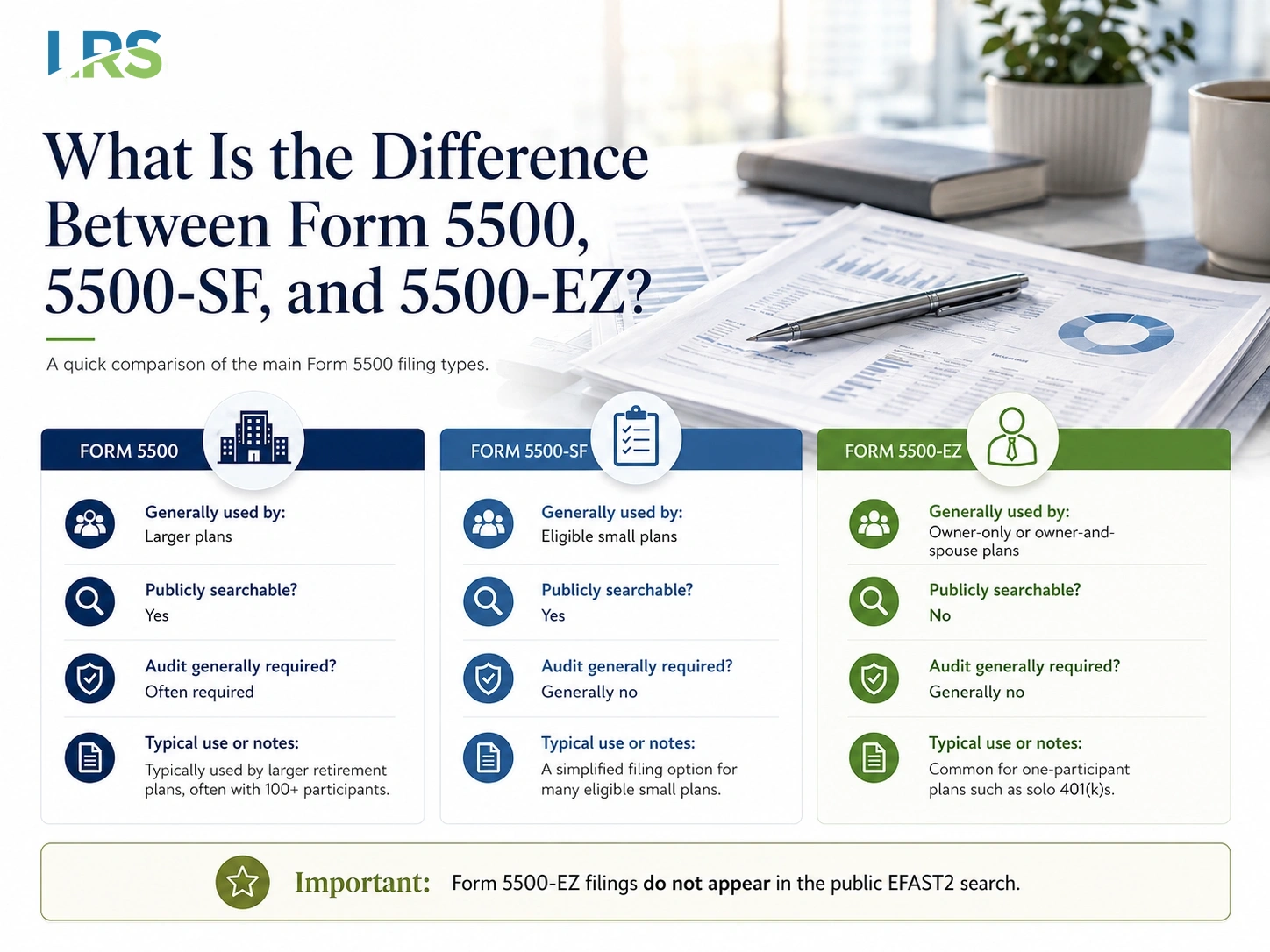
One key exception: plans that hold employer securities
The size-based rules above have an important exception. Any plan that held employer securities at any point during the year is barred from the short Form 5500-SF and must file the full Form 5500 instead, no matter how few participants it has.
This comes up most often with ROBS arrangements, where the 401(k) plan itself owns stock in the company it sponsors – a qualified employer securities, or QES, investment. Because the plan rather than the individual owns the business, many of these plans also fall outside the one-participant definition, so small and even owner-only ROBS plans routinely file the full Form 5500 rather than the 5500-SF or 5500-EZ. A plan holding employer securities also carries a higher ERISA fidelity bond maximum, and the same non-qualifying asset test drives the small plan audit waiver. For anyone researching a plan, that has a useful side effect: unlike a solo 5500-EZ, a small ROBS plan’s full Form 5500 is part of the public record and will appear in your EFAST2 search.
What a Form 5500 Actually Tells You
Pulling the filing is only half the job. Once the PDF is open, a few areas carry most of the useful information:
- Participant counts. The form reports how many people the plan covers and how many hold account balances. Sudden swings can signal turnover, a corporate change, or a plan approaching the audit threshold.
- Plan assets and financial activity. The financial schedules (Schedule H for large plans, Schedule I for many small plans) show total assets, contributions, distributions, and expenses for the year.
- The independent audit. For large plans, the attached auditor’s report provides additional information about the plan’s financial reporting and compliance processes. A qualified or adverse opinion may indicate issues requiring further review.
- Service providers and fees. Schedule C reports what a plan pays its service providers, and Schedule A reports its insurance contracts. Both attach only to the full Form 5500 – the 5500-SF and 5500-EZ are standalone forms that carry no schedules – and Schedule C is required only for large plans. So when a filing does not include one of these schedules, it usually means the schedule was not required for that plan, not that the information is missing or being withheld.
That is worth separating from genuine confidentiality. Most of the return is open to public inspection, but a few schedules that contain sensitive participant data, such as the deferred vested participant statement, are deliberately kept confidential and are not part of the public file. A missing Schedule C on a small plan is a “not required” case; the withheld participant schedules are a privacy case.
2025 Plan Year Deadlines, Penalties, and a Rule That Changed Who Gets Audited
Current deadlines
The Form 5500 is due the last day of the seventh month after the plan year ends. For a calendar-year plan, that means the 2025 plan year filing is due July 31, 2026. Filing IRS Form 5558 by that date extends the deadline two and a half months, to October 15, 2026. Most sponsors also have to distribute a Summary Annual Report to participants within two months after the filing deadline.
What a missed filing costs
Penalties for a late or missing Form 5500 are steep, and two agencies can assess them for the same failure:
- The Department of Labor can assess up to $2,739 per day, with no cap, for a late or incomplete filing.
- The IRS can separately assess $250 per day, up to $150,000 per plan year.
- Sponsors who come forward before the DOL contacts them can use the Delinquent Filer Voluntary Compliance Program (DFVCP) to cap penalties at a small fraction of that exposure. One-participant plans use a separate IRS relief program instead.
Organizations that identify potential filing gaps may wish to review available correction programs and penalty relief options before enforcement action occurs. Our team handles exactly these situations through our consulting and correction services.
The 2023 participant-count change is still reshaping audits
For plan years beginning on or after January 1, 2023, the government changed how defined contribution plans count participants for the 100-participant audit threshold. Plans now count only participants who actually hold an account balance at the start of the plan year, rather than every eligible employee whether or not they ever contributed. The practical effect is significant: many plans that were near the line have moved from “large” to “small” status and no longer need an independent audit. If you are checking whether a plan should have an audited financial statement attached, this is the rule that decides it – and it is the reason some recent filings look different from older ones for the same plan.
When It Makes Sense to Bring in Help
Searching and reading a Form 5500 is straightforward. Preparing an accurate one, meeting the audit requirement, and fixing a filing that went wrong are not.
Leading Retirement Solutions helps employers and plan sponsors stay ahead of Form 5500 obligations across the country:
- Plan administration and Form 5500 preparation and recordkeeping to keep every annual report accurate and on time.
- Large plan audit support for plans that cross the 100-participant threshold and need an independent audit filed with their Form 5500.
- Consulting and correction services to resolve late, missing, or incorrect filings before they turn into penalties.
Schedule a consultation with our team to review your plan’s filing history and requirements.
Frequently Asked Questions
Is Form 5500 information really free to search?
Yes. The official EFAST2 database at efast.dol.gov lets anyone search and download Form 5500 and 5500-SF filings at no cost and without an account. Paid third-party sites simply repackage the same public data.
Can I look up a solo 401(k) or an owner-only plan?
No. One-participant plans file the Form 5500-EZ, and the Department of Labor does not make that data public. Even though it is filed electronically through EFAST2, it will not appear in the public search. The owner must retrieve it from their own records or provider.
How far back do filings go, and why is the latest one old?
Public electronic filings generally go back to 2009. Because the form is due about seven months after the plan year ends and many plans extend, the most recent filing you find can be a year or more old even for a fully compliant plan.
When is the Form 5500 due for the 2025 plan year?
For calendar-year plans, the 2025 filing is due July 31, 2026. Filing Form 5558 by that date extends the deadline to October 15, 2026.
What happens if a plan files late or not at all?
The Department of Labor can assess up to $2,739 per day with no cap, and the IRS can add $250 per day up to $150,000 per year. Sponsors who come forward voluntarily through the DFVCP before being contacted can reduce those penalties dramatically.
This article is provided for general informational purposes and does not constitute legal, tax, or investment advice. Filing requirements depend on the specific facts of your plan.